Claude Code: Complete Guide to Installation, Usage, Commands & Latest Models (2026)
Master Claude Code from installation to advanced agentic workflows. Complete guide covering setup, slash commands, CLAUDE.md, MCP servers, Routines, and the latest Claude Opus 4.6 & Sonnet 4.6 models.
Claude Code: Complete Guide to Installation, Usage, Commands & Latest Models (2026)
Claude Code has fundamentally changed what it means to have an AI coding assistant. Unlike browser-based chatbots where you copy-paste code back and forth, Claude Code lives directly inside your terminal, it reads your real files, understands your entire codebase, runs commands, manages git, and executes multi-step agentic workflows, all through natural language.
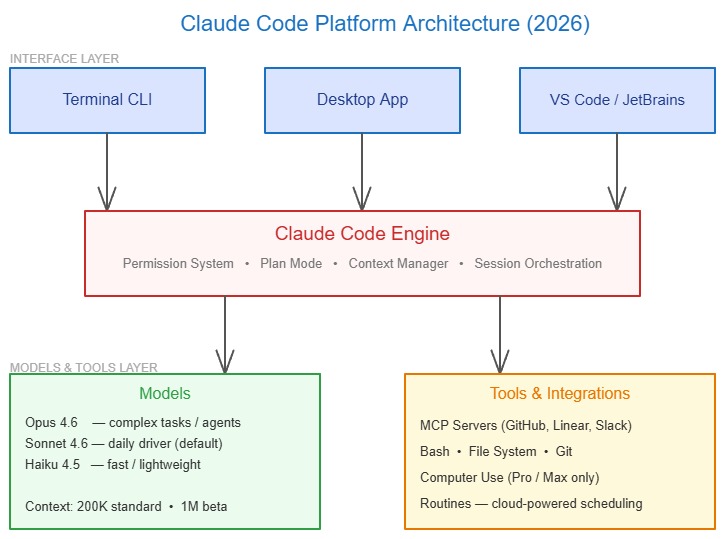
In April 2026, Claude Code is no longer just a CLI tool. It’s a full agentic work platform: a redesigned desktop app, cloud-powered Routines that run while your laptop is off, computer use that lets Claude click through UIs, and parallel multi-agent sessions you can orchestrate from a single window. If you haven’t tried it yet, you’re missing the most significant shift in developer productivity since GitHub Copilot.
This guide takes you from zero to production-ready: installation across every platform, all slash commands explained, CLAUDE.md configuration, MCP server setup, Routines, and how to pick the right model (Opus 4.6 vs. Sonnet 4.6) for every task.
What You'll Learn
This guide covers everything you need to go from installation to advanced agentic workflows:
- Installing Claude Code on macOS, Linux, and Windows (native + npm)
- Authentication, account requirements, and first-run setup
- All essential slash commands and how to build custom ones
- CLAUDE.md, the most important config file most developers skip
- MCP servers: turning Claude Code into a full agent with external tools
- Routines: scheduled automation that runs in the cloud without your laptop
- Latest models: Claude Opus 4.6 and Sonnet 4.6, when to use which
- Real-world workflows for Python backends and Next.js apps
What Is Claude Code? (Definition + Why It’s Different)
Claude Code is Anthropic’s terminal-native AI coding agent. It reads, edits, and debugs your entire codebase through natural language, and it does this on your local machine, with full access to your file system, your git history, and your running processes.
What makes it fundamentally different from chatbot-style AI tools:
- Terminal-native, not browser-based: Claude Code runs where your code actually lives. No copy-pasting, no file uploads, no context loss between sessions.
- Full codebase awareness: It indexes your entire project, understands how files relate to each other, and maintains context across a 200K token window (1M token beta on Opus 4.6).
- Permission-first execution: Every file change and shell command requires your explicit approval before running. You stay in control.
- Plan Mode: For complex tasks, Claude outlines a full step-by-step execution plan and waits for your sign-off before touching a single file.
- Agentic architecture: Claude Code is powered by Claude’s most capable models, Opus 4.6 and Sonnet 4.6, and can execute multi-step tasks autonomously.
| Feature | Claude Code | GitHub Copilot | ChatGPT |
|---|---|---|---|
| Runs in terminal | ✅ Yes | ❌ IDE only | ❌ Browser |
| Reads full codebase | ✅ Yes | ✅ Partial | ❌ Manual upload |
| Executes git commands | ✅ Yes | ❌ No | ❌ No |
| Multi-file edits | ✅ Yes | ✅ Limited | ❌ Manual |
| Scheduled automation | ✅ Routines | ❌ No | ❌ No |
| MCP tool integrations | ✅ Yes | ❌ No | ❌ No |
| Computer use | ✅ Pro/Max | ❌ No | ❌ No |
| Context window | 200K–1M | ~8K | 128K |
2026 Status
Claude Code is now available as a terminal CLI, a native desktop app (Mac + Windows), and via IDE extensions for VS Code and JetBrains. The desktop app received a major redesign in April 2026, adding multi-session management, an integrated terminal, HTML/PDF preview, and a drag-and-drop layout.
Account Requirements & Pricing
Before installing, you need the right Claude account. The free Claude.ai plan does not include Claude Code access.
| Plan | Price | Claude Code Access | Rate Limits |
|---|---|---|---|
| Free | $0/mo | ❌ Not included | , |
| Pro | $20/mo | ✅ Included | Standard (5-hr + 7-day windows) |
| Max | $100–200/mo | ✅ Included | High, 5× or 20× Pro limits |
| Team | $30/user/mo | ✅ Included | Team-wide shared limits |
| Enterprise | Custom | ✅ Included | Configurable |
| API Console | Pay-per-token | ✅ Via API key | Depends on spend |
Rate Limits Note
Pro users hitting rate limits in under an hour is a known issue Anthropic acknowledged in early 2026. If you’re doing intensive agentic work, large refactors, multi-file generation, Agent Teams, Max plan is worth the investment. Use /status inside Claude Code to check your current rate limit windows.
Installation: Every Platform, One Command
macOS & Linux, Native Installer (Recommended)
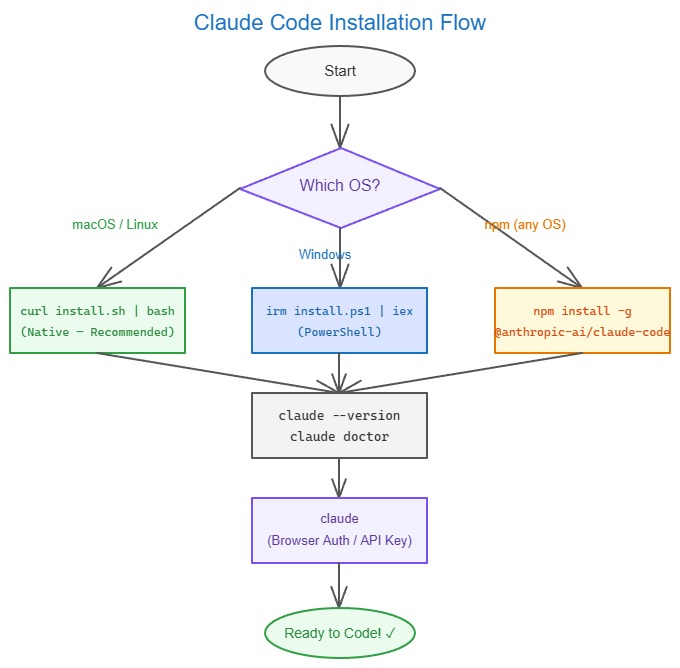
The native installer is Anthropic’s recommended method as of 2026. It requires zero dependencies: no Node.js, no npm, and auto-updates in the background.
# macOS / Linux: native installer (recommended)
curl -fsSL https://claude.ai/install.sh | bash

# Verify installation
claude --version

# Run diagnostics
claude doctor
For systems without curl, wget works as an alternative:
wget -qO- https://claude.ai/install.sh | bashHomebrew alternative (macOS):
# Stable channel (roughly 1 week behind, skips regressions)
brew install claude-code

# Latest channel (newest features immediately)
brew install claude-code@latest

# Manual update required for Homebrew
brew upgrade claude-code
Windows, Native PowerShell Installer
# Run this in PowerShell (NOT CMD)
irm https://claude.ai/install.ps1 | iex

# Verify
claude --versionPowerShell vs CMD
If you see The token '&&' is not a valid statement separator, you’re in PowerShell, not CMD. If irm is not recognized, you’re in CMD. Your prompt shows PS C:\ in PowerShell and C:\ without the PS in CMD. The PowerShell installer is the correct one for native Windows.
Claude Code uses Git Bash internally to execute commands on Windows. Install Git for Windows if you don’t have it. If Claude Code can’t find it automatically, set the path in your settings.json:
{
  "env": {
    "CLAUDE_CODE_GIT_BASH_PATH": "C:\\Program Files\\Git\\bin\\bash.exe"
  }
}
npm Install (All Platforms, Pinned Versions)
# npm method: use when you need to pin a specific version
npm install -g @anthropic-ai/claude-code

# IMPORTANT: Never use sudo with npm install
# If you get EACCES errors, use nvm instead:
curl -o- https://raw.githubusercontent.com/nvm-sh/nvm/v0.40.0/install.sh | bash
nvm install 22
nvm use 22
npm install -g @anthropic-ai/claude-code
The npm method does not auto-update. You must run npm update -g @anthropic-ai/claude-code manually.
System Requirements
| OS | Minimum Version | Notes |
|---|---|---|
| macOS | 13.0 (Ventura) | Native binary or Homebrew |
| Ubuntu / Debian | Ubuntu 20.04 / Debian 10 | Native binary |
| Windows | 10 (build 1809+) | Native via PowerShell; WSL2 optional |
| Node.js (npm method) | 18.0+ (22 LTS recommended) | Only needed for npm method |
Authentication & First Run
# Start Claude Code: opens browser on first run
claude

# API key method (CI/CD, headless environments)
export ANTHROPIC_API_KEY="sk-ant-..."
claude
On first launch you’ll:
- Choose a text/color theme (
/themeto change later) - Log in via browser OAuth (browser opens automatically)
- See the Claude Code welcome screen
For CI/CD pipelines, skip the browser entirely with an API key env variable. Claude Code detects ANTHROPIC_API_KEY automatically.
# Also works with Amazon Bedrock
export ANTHROPIC_BEDROCK_ENDPOINT="..."
export AWS_REGION="us-east-1"

# Or Google Vertex AI
export ANTHROPIC_VERTEX_PROJECT_ID="..."
export CLOUD_ML_REGION="us-central1"
Essential Slash Commands: Complete Reference
Slash commands are the control layer of Claude Code. You don’t need to memorize all of them, most of the time you just type in plain English, but these are the ones you’ll use daily.
Session Management
| Command | What It Does |
|---|---|
/help | Show all available commands |
/clear | Clear conversation history (start fresh context) |
/compact | Auto-compress conversation history to free context window space |
/context | Show current context usage and token counts |
/status | Check auth, subscription tier, and rate limit windows |
/logout | Sign out of current session |
/recap | Summarize the session so far, useful when returning to a long session |
/rewind | Undo recent code changes and revert the conversation |
Configuration & Models
| Command | What It Does |
|---|---|
/config | View and change configuration settings |
/model | Switch between Claude models mid-session |
/effort | Tune speed vs. intelligence (opens interactive slider) |
/theme | Change terminal color theme (includes “Auto match terminal” option) |
# Switch to Opus 4.6 for a complex task
/model claude-opus-4-6

# Switch back to Sonnet 4.6 for routine tasks
/model claude-sonnet-4-6

# Set effort level (low / medium / high / xhigh / max)
/effort high
Code & Project Commands
| Command | What It Does |
|---|---|
/init | Auto-generate a CLAUDE.md for the current project |
/plan | Enter Plan Mode, Claude outlines steps before executing |
/review | Run a code review on current changes |
/security-review | Run a security-focused review on recent git changes |
/autofix-pr | Enable automatic PR fix from the terminal |
/loop | Self-paced looping execution, Claude reruns until task is done |
Advanced Agentic Commands
| Command | What It Does |
|---|---|
/schedule | Create a cloud-powered Routine (runs without your laptop) |
/ultraplan | Draft a multi-step plan in the cloud, edit in web editor, run remotely |
/ultrareview | Parallel multi-agent code review in the cloud |
/team-onboarding | Package your Claude Code setup as a replayable onboarding guide |
/less-permission-prompts | Scan transcripts and propose an allowlist to reduce approval friction |
MCP & Integrations
# Add an MCP server
claude mcp add --transport http my-server https://my-server-url.com

# List configured MCP servers
claude mcp list

# Remove an MCP server
claude mcp remove my-server
CLAUDE.md: The Most Important File Most Developers Skip
CLAUDE.md is a Markdown file in your project root that gives Claude persistent context across every session. It’s the difference between Claude making generic suggestions and Claude understanding your actual architecture, conventions, and workflow.
Run /init to auto-generate a starting CLAUDE.md, then customize it.
# CLAUDE.md: Project Context for Claude Code

## Project Overview
Python FastAPI backend + Next.js 14 App Router frontend.
Monorepo structure: /backend (FastAPI), /frontend (Next.js), /shared (types).

## Tech Stack
- Backend: Python 3.12, FastAPI, SQLAlchemy 2.0, Alembic, PostgreSQL
- Frontend: Next.js 14, TypeScript, Tailwind CSS v4, Shadcn/UI
- Testing: pytest (backend), Vitest + React Testing Library (frontend)
- Infra: Docker, GitHub Actions CI/CD

## Code Conventions
- Python: Black formatter, isort, type hints required on all functions
- TypeScript: Strict mode enabled, no `any` types allowed
- API: RESTful with versioning (/api/v1/...), always use Pydantic schemas
- Commits: Conventional commits format (feat:, fix:, chore:, docs:)

## Common Commands
- Backend dev: `cd backend && uvicorn main:app --reload`
- Frontend dev: `cd frontend && pnpm dev`
- Run all tests: `make test`
- Lint: `make lint`
- Migrate DB: `alembic upgrade head`

## Architecture Notes
- Auth uses JWT (access + refresh tokens). See backend/auth/
- All API responses follow {data, error, meta} envelope pattern
- Frontend uses React Query for server state, Zustand for client state
- Background tasks go through Celery workers, not FastAPI BackgroundTasks

## Testing Requirements
- All new endpoints must have at least unit + integration tests
- Use pytest fixtures from tests/conftest.py
- Mock external services: never hit real APIs in testsPro Tip: CHANGELOG.md as Working Memory
Anthropic’s own scientific computing guide recommends maintaining a CHANGELOG.md as Claude Code’s working memory for multi-day sessions. Each session, Claude reads it to understand what has already been done and what comes next. Combine this with regular git commits as checkpoints and tmux for long-running multi-day workflows.
Custom Slash Commands: Automate Your Workflow
Create project-specific slash commands by adding Markdown files to .claude/commands/ in your repo.
mkdir -p .claude/commandsExample: /review command
<!-- .claude/commands/review.md -->
Review the current git diff for:
- Security vulnerabilities and injection risks
- Performance bottlenecks and N+1 queries
- Missing error handling and edge cases
- Type safety violations
- Style violations per CLAUDE.md conventions
- Missing or outdated tests

Focus on $ARGUMENTS if provided, otherwise review the full diff.
Output findings as a prioritized list: CRITICAL > HIGH > MEDIUM > LOW.
Example: /new-endpoint command for FastAPI
<!-- .claude/commands/new-endpoint.md -->
Create a new FastAPI endpoint for: $ARGUMENTS

Follow these steps:
1. Create Pydantic schemas in schemas/ (request + response)
2. Add SQLAlchemy model if new entity is needed
3. Create CRUD functions in crud/
4. Add router in routers/ with proper HTTP methods and status codes
5. Register router in main.py
6. Write pytest tests covering happy path + error cases
7. Update CHANGELOG.md with what was added

Always add type hints, docstrings, and follow the {data, error, meta} response envelope.
Use your custom command:
/new-endpoint "user profile update with avatar upload support"MCP Servers: Turning Claude Code into a Full Agent
Model Context Protocol (MCP) servers are what elevate Claude Code from a coding assistant into a proper agent with access to your tools, APIs, and external systems.
Popular MCP integrations:
- GitHub MCP: Read/write issues, PRs, and repos directly from your terminal
- Linear MCP: Fetch tickets, update statuses, create issues without leaving the session
- Slack MCP: Read channel history and post updates as part of automated workflows
- PostgreSQL MCP: Query your database, inspect schemas, generate migrations
- Filesystem MCP: Extended file operations beyond what the default Bash tool provides
- Brave Search MCP: Give Claude real-time web search during agentic tasks
Setting up GitHub MCP:
# Add GitHub MCP server
claude mcp add --transport http github https://api.githubcopilot.com/mcp/

# Verify
claude mcp list

# Now you can use it naturally in session:
# "Fetch all open PRs assigned to me and summarize what needs review"
# "Create a PR for the current branch targeting main with a description"
# "Find all issues labeled bug and triage them by severity"
Team-wide MCP config: Commit a .claude/ directory to your repo with settings.json. New team members inherit your entire MCP setup automatically on first claude launch.
// .claude/settings.json
{
  "mcpServers": {
    "github": {
      "transport": "http",
      "url": "https://api.githubcopilot.com/mcp/"
    },
    "postgres": {
      "transport": "stdio",
      "command": "npx",
      "args": ["-y", "@anthropic-ai/mcp-server-postgres", "postgresql://localhost/mydb"]
    }
  }
}
Routines: Scheduled Automation in the Cloud
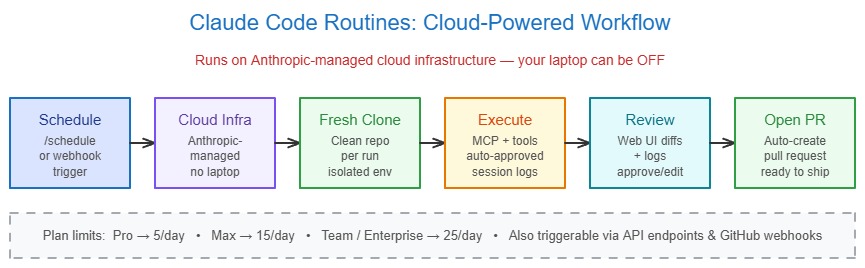
Routines are one of the most significant additions to Claude Code in 2026. They’re automated tasks that run on Anthropic’s cloud infrastructure: meaning your laptop doesn’t need to be on or online for them to execute.
What Routines enable:
- Nightly triage of open bugs from a Linear or GitHub backlog
- Automatic CI failure detection and PR fix attempts every morning
- Weekly dependency audits scanning for outdated or vulnerable packages
- Syncing documentation after merges to main
- Scheduled code review reports delivered to Slack
Creating a Routine:
# From the CLI: opens interactive setup
/schedule

# Or describe the task directly
/schedule "Every Monday at 9 AM, fetch all open PRs from the repo,
summarize review status, and post a digest to the #eng-standup Slack channel"
Each Routine run:
- Starts from a fresh clone of your repo
- Creates its own isolated session
- Gives you a web UI to inspect the work, review diffs, and open PRs
- Respects your attached repo permissions and MCP connectors
Routine limits by plan:
| Plan | Daily Routines |
|---|---|
| Pro | 5/day |
| Max | 15/day |
| Team / Enterprise | 25/day (additional available) |
You can also trigger Routines programmatically via API Routines (dedicated endpoints + auth tokens) or Webhook Routines (GitHub events that auto-open Claude sessions to fix CI failures or address PR comments).
Routines vs. Scheduled Tasks
Routines (launched April 14, 2026) replaced the earlier /schedule preview. Routines run on Anthropic-managed cloud infrastructure with repo access and MCP connectors pre-attached. They’re visible and manageable from the Claude web UI, the desktop app, or the CLI, whichever you prefer.
Latest Models: Claude Opus 4.6 vs. Sonnet 4.6
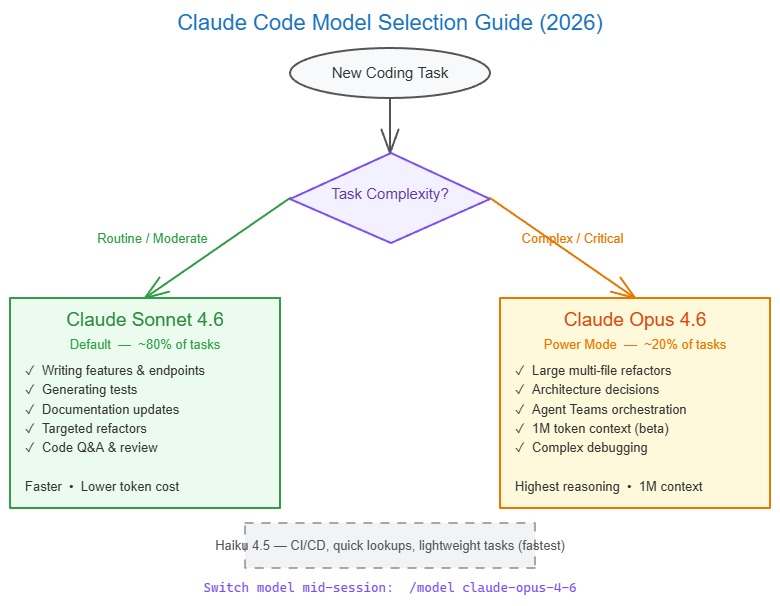
As of April 2026, Claude Code runs on two primary models. Picking the right one for the right task is the biggest lever for balancing quality, speed, and token cost.
Model Overview
| Model | API String | Context | Best For | Speed |
|---|---|---|---|---|
| Claude Opus 4.6 | claude-opus-4-6 | 200K (1M beta) | Complex architecture, large refactors, agent teams, long-context debugging | Slower |
| Claude Sonnet 4.6 | claude-sonnet-4-6 | 200K (1M beta) | Everyday coding, feature additions, test writing, documentation | Faster |
| Claude Haiku 4.5 | claude-haiku-4-5-20251001 | 200K | Lightweight tasks, CI checks, quick lookups | Fastest |
Deprecation Notice
Claude Sonnet 4 (claude-sonnet-4-20250514) and Claude Opus 4 (claude-opus-4-20250514) are deprecated and scheduled for retirement on the Claude API on June 15, 2026. Migrate to Sonnet 4.6 and Opus 4.6 respectively.
Claude Opus 4.6, When to Use It
Opus 4.6 is Anthropic’s most capable model as of 2026. It raised the ceiling significantly over Opus 4 on:
- Large-codebase debugging and code review
- Complex multi-file refactoring touching dozens of files
- Long-running delegated agent tasks (Agent Teams)
- Architecture-level decisions requiring deep reasoning
- Legal and financial reasoning (highest scores of any Claude model)
- Any task where the 1M token beta context is needed (entire codebase in one session)
Rule of thumb: Use Opus 4.6 for roughly 20% of your tasks: the hardest, most complex ones.
# Switch to Opus 4.6 mid-session for a hard problem
/model claude-opus-4-6

# Set high effort for maximum reasoning depth
/effort xhigh
Claude Sonnet 4.6, Your Daily Driver
Sonnet 4.6 is the default in Claude Code and the right choice for roughly 80% of everyday tasks:
- Writing new features and API endpoints
- Generating tests from existing code
- Writing and updating documentation
- Refactoring functions and modules
- Reviewing specific files or diffs
- Answering questions about your codebase
Sonnet 4.6 delivers improved agentic search performance and consumes fewer tokens than Opus while maintaining strong code generation quality.
# Sonnet 4.6 is the default: check your current model
/status

# Explicitly set if needed
/model claude-sonnet-4-6
Effort Levels (Opus 4.7 Preview)
Claude Code now supports tunable effort levels via /effort:
| Effort Level | Speed | Intelligence | Best For |
|---|---|---|---|
low | Fastest | Baseline | Quick lookups, simple edits |
medium | Fast | Good | Feature additions, tests |
high | Normal | Strong | Default for most tasks |
xhigh | Slow | Very strong | Complex debugging, architecture |
max | Slowest | Maximum | Hardest problems, multi-day tasks |
Real-World Workflows
Workflow 1: Build a FastAPI Endpoint from Scratch
# Start Claude Code in your backend directory
cd backend
claude

# Describe what you need in plain English
> "Add a POST /api/v1/users/{user_id}/avatar endpoint that accepts
  multipart image upload, validates file type and size (max 5MB),
  stores to S3, updates the user record, and returns the new avatar URL.
  Include Pydantic schemas, CRUD function, router, and pytest tests."

# Claude will use Plan Mode automatically for multi-file tasks
# Review the plan → approve → Claude executes across all files

# After generation, run your tests
> "Run the new avatar endpoint tests and fix any failures"
Workflow 2: Debug a Next.js App Router Issue
cd frontend
claude

> "I'm getting a hydration mismatch error on the /dashboard page.
  Read the page component, its server components, and all child components.
  Identify the root cause and fix it without breaking the existing layout."
Workflow 3: Multi-File Refactor with Plan Mode
> /plan "Migrate all database calls from raw SQLAlchemy Core to the
  SQLAlchemy 2.0 ORM style. Audit every file in crud/ and models/,
  generate a migration plan showing which patterns need to change,
  then execute the refactor file by file."

# Review Claude's plan output
# Type "go" or "proceed" to execute
Workflow 4: Automated PR Review Routine
# Create a Routine that runs every morning
/schedule "Every weekday at 8 AM: fetch all open PRs in the repo,
review each one for security issues, missing tests, and style violations
per CLAUDE.md conventions, then post a prioritized review comment on each PR."
Deploying Claude Code in CI/CD
Claude Code can run headlessly in GitHub Actions, GitLab CI, or any pipeline with an API key.
# .github/workflows/claude-review.yml
name: Claude Code Review

on:
  pull_request:
    types: [opened, synchronize]

jobs:
  review:
    runs-on: ubuntu-latest
    steps:
      - uses: actions/checkout@v4
        with:
          fetch-depth: 0

      - name: Install Claude Code
        run: curl -fsSL https://claude.ai/install.sh | bash

      - name: Run Claude Code review
        env:
          ANTHROPIC_API_KEY: ${{ secrets.ANTHROPIC_API_KEY }}
        run: |
          claude --bare -p "Review the git diff between HEAD and main.
          Check for security vulnerabilities, missing error handling,
          and violations of our CLAUDE.md conventions.
Output findings as GitHub PR review comments in JSON format."--bare Flag
The --bare flag (added in 2026) skips hooks, LSP, plugin sync, and skill directory walks for scripted -p (print/pipe) calls. This makes CI runs faster and deterministic. Requires ANTHROPIC_API_KEY or apiKeyHelper via --settings.
Desktop App: The 2026 Redesign
The Claude Code desktop app received a major redesign in April 2026, repositioning it from a single conversation window to a full orchestration command center.
Key new features:
- Mission Control sidebar: manage all active and recent sessions in a single view, filter by status, project, or environment
- Multi-session management: run multiple Claude sessions side by side in one window
- Side chat: open a context-aware chat that knows about the main session without interrupting the agent
- Integrated terminal: build and test without leaving the app
- File editor: edit files directly in the app with syntax highlighting
- HTML & PDF preview: verify UI output and documents inline
- Faster diff viewer: rebuilt for performance on large changesets
- Drag-and-drop layout: arrange panes to your preference
Desktop vs. Terminal Trade-offs
The desktop app is excellent for orchestrating and reviewing multi-agent sessions, but the terminal interface remains superior for raw execution power and flexibility, especially if you frequently switch models or use custom MCP configurations. For most enterprise teams, the recommended workflow is: terminal for execution, desktop app for review and management.
Performance & Cost Optimization
1. Use the Right Model for the Task
Don’t use Opus 4.6 for everything. Sonnet 4.6 handles 80% of tasks just as well at lower token cost and higher speed. Reserve Opus for genuinely hard problems.
2. Keep CLAUDE.md Focused
A bloated CLAUDE.md with hundreds of lines slows down every session. Keep it to your most important conventions, commands, and architecture notes. Aim for under 200 lines.
3. Use /compact Proactively
Don’t wait until Claude Code warns you about context limits. Run /compact between major task segments to compress history. FlashCompact reduces compaction time significantly for large sessions.
4. /clear Between Unrelated Tasks
When you switch from backend work to frontend, or from a refactor to writing docs, use /clear to start with a clean context. Carrying unrelated history wastes tokens and can confuse the model.
5. Custom Commands for Repeated Workflows
Every workflow you repeat more than three times should become a custom slash command in .claude/commands/. This produces better, more consistent results than re-explaining the task each time.
6. Cache Common Prompts with 1-Hour TTL
For API key users doing high-volume work, set ENABLE_PROMPT_CACHING_1H=1 to opt into 1-hour prompt cache TTL, reducing costs on repeated system prompts and CLAUDE.md content.
Challenges & Known Limitations
1. Rate Limits on Pro Plan
Pro users doing intensive agentic work can hit 5-hour rate limit windows quickly. Workarounds: use /effort low for simple tasks, batch related work in single sessions, or upgrade to Max.
2. Desktop App Terminal Latency
The integrated terminal in the desktop app can lag for users accustomed to native terminal speed. For latency-sensitive work, use the CLI directly.
3. Hallucinations on Unfamiliar Code Patterns
Claude Code can confidently edit files in unfamiliar frameworks. Always use Plan Mode for large refactors so you can catch misunderstandings before any file is touched.
4. Context Drift in Very Long Sessions
For sessions exceeding several hours, run /recap to help Claude re-anchor on the session’s goals. For multi-day work, maintain a CHANGELOG.md as persistent working memory.
5. Model Lock in Desktop App
The desktop app is strictly optimized for Anthropic models. Power users who switch between Claude and other AI models (for rate limit workarounds or architectural diversity) will find the terminal interface more flexible.
Frequently Asked Questions (FAQs)
What is the difference between Claude Code terminal and the desktop app?
The terminal CLI is the original Claude Code interface, maximum flexibility, all features, compatible with any MCP setup, and the best choice for high-performance execution. The redesigned desktop app (April 2026) is built for orchestration: managing multiple parallel agent sessions, reviewing diffs visually, previewing HTML/PDF output, and monitoring session status from a single window. Most developers use both: terminal for coding tasks, desktop app for review and multi-session management.
What is the 1M token context window on Opus 4.6?
Claude Opus 4.6 offers a 1M token context window in beta (200K is the standard). This means you can load an entire large codebase, all source files, tests, documentation, and changelogs, into a single session without losing context. This is especially powerful for large-codebase debugging, architectural audits, and Agent Teams working across a monorepo. The 1M window is available on Max, Team, and Enterprise plans.
What are MCP servers and do I need them?
MCP (Model Context Protocol) servers are integrations that give Claude Code direct access to external tools and APIs, GitHub, Linear, Slack, PostgreSQL, and more. Without MCP, you have to manually copy data between Claude and your tools. With MCP, Claude can fetch GitHub issues, query your database, post Slack messages, and read Linear tickets directly during agentic tasks. They’re optional for casual use but become essential once you’re building serious agentic workflows.
When should I use Opus 4.6 vs. Sonnet 4.6?
Use Sonnet 4.6 (the default) for approximately 80% of everyday tasks: writing features, generating tests, documentation, targeted refactors, and codebase Q&A. Switch to Opus 4.6 for the hardest 20%: complex multi-file architecture changes, large-codebase debugging spanning hundreds of files, Agent Teams orchestration, tasks requiring the 1M token context, and any long-running delegated workflows where getting it right the first time matters more than speed.
Can I use Claude Code with Amazon Bedrock or Google Vertex AI?
Yes. Claude Code supports Amazon Bedrock, Google Vertex AI, and Microsoft Foundry as alternative API providers. Set the appropriate environment variables (AWS credentials for Bedrock, GCP credentials for Vertex) before launching Claude Code. This is common in enterprise environments where data sovereignty or existing cloud spend commitments make direct Anthropic API use impractical. Note that the Messages API on Amazon Bedrock is currently in research preview as of April 2026.
How do Routines differ from running Claude Code in a cron job?
Traditional cron jobs require your machine to be on, your API key to be configured, and your environment to be set up. Routines run entirely on Anthropic-managed cloud infrastructure, your laptop doesn’t need to be online. Each Routine run starts from a fresh clone of your repo, has access to your attached MCP connectors and repos, and gives you a web-based UI to review diffs and open PRs. They’re also triggerable via API endpoints and GitHub webhooks, making them suitable for production automation pipelines.
How I Can Help You with Claude Code Projects
As an AI engineer and backend developer with extensive Python and Next.js experience, I’ve integrated Claude Code into production workflows, from FastAPI service generation and automated testing pipelines to Next.js App Router debugging and multi-agent orchestration with MCP servers.
Whether you’re setting up Claude Code for your team, building agentic CI/CD pipelines, or integrating MCP servers with your internal tools, I can help you go from setup to production-ready workflows.
Claude Code Workflow Setup
Set up Claude Code for your team: CLAUDE.md configuration, MCP integrations, custom slash commands, and Routines.
View Projects →Agentic Pipeline Development
Build production-grade CI/CD pipelines and multi-agent workflows powered by Claude Opus 4.6 and Sonnet 4.6.
Get in Touch →Conclusion
Claude Code in 2026 is not the same tool it was a year ago. It started as a clever terminal wrapper around the Claude API. Today it’s a full agentic development platform: a redesigned desktop app for orchestrating multiple parallel sessions, cloud-powered Routines that run scheduled automation without your laptop, computer use for navigating browser UIs that escape the terminal, and MCP servers that give Claude direct access to your entire toolchain.
The fundamentals remain the same, install it, point it at a project, talk to it in plain English, but the ceiling for what you can delegate has risen dramatically.
The biggest mistake developers make is using Claude Code like a chatbot: one question, one answer, repeat. The real power comes from the agentic pattern: give Claude a goal, let it plan, approve the plan, then stay in the orchestrator seat while it executes across your entire codebase. That’s the workflow this guide has prepared you for.
Start with installation, set up your first CLAUDE.md, add one MCP server, and build your first custom slash command. Once those feel natural, schedule your first Routine. From there, the workflow compounds.
Ready to build something with Claude Code? Explore my AI projects or get in touch to discuss setting up a production-ready agentic development workflow for your team.